Your logo.
Ready for launch.
Clean up your logo, turn it into a scalable SVG, and build matching favicons, social images, and a brand kit. One workspace, from the file you have to the assets you need.
Full brand kits and asset packs with Pro · $9/month or $59/year.
Loading interactive demo...
Start with the logo you have
Drop in a PNG, JPG, WebP, GIF, or SVG. Refine it, compare the result, and download your SVG free.
Try It Free01 / Make it yours
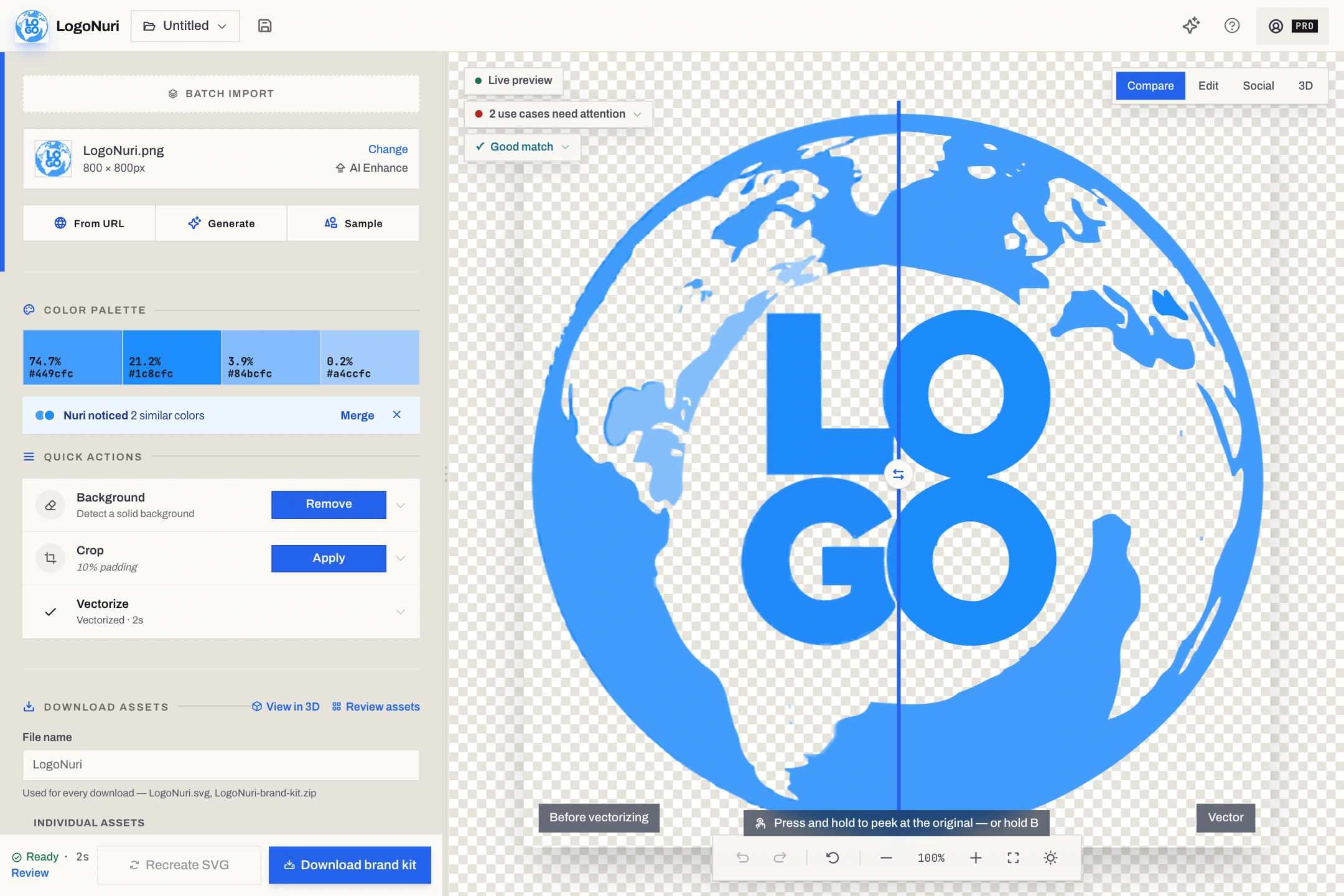
From rough file
to a consistent brand.
Refine once, then carry your logo and colors into the assets for your website, launch, and client handoff.
Your Pro brand kit
A handoff you
can build on.
Named folders, matching assets, and the setup details. All from the same project.
- logo/
- SVG, PNG, and monochrome variations
- favicons/
- Browser, Apple Touch, and maskable icons
- social-media/
- Link previews, square posts, and profiles
- documents/
- Brand guidelines PDF, CSS and JSON colors
Crop & center
Trim whitespace and control the padding.
AI upscale
4× local upscaling. Five uses a day free.
Remove backgrounds
Solid-color cleanup or AI removal. Five AI uses a day free.
Refine your colors
Swap colors, adjust contrast, and keep refining.
Core processing stays in your browser. Cloud sync, public sharing, URL imports, and website captures use online services.
Privacy details02 / Match your theme
Same brand.
A different light.
Keep your brand colors. Let the right details adapt to the page around them.
Try the light switch in the preview
currentColor
Converts fills to fill="currentColor". Embed the SVG inline to inherit your page’s text color. An SVG loaded through an image tag does not inherit the parent’s color.
Smart currentColor
Only converts near-black/white. Brand colors stay untouched. Red icon + black text? Text adapts, icon stays red.
03 / Finish the workflow
Ready to build. Easy to hand off.
Your logo is the starting point. LogoNuri brings the cleanup, formats, theme variants, and handoff files into the same workflow.
- Refine with the result in view.
- Remove a background, swap a color, crop, or tune the trace. Compare the original and processed artwork, with undo and redo as you work.
- Get the files and the setup details.
- Pro includes named folders, a web manifest, HTML snippets, CSS and JSON palette files, and a brand guidelines PDF. Spend less time assembling the handoff.
- Start free. Package when you’re ready.
- Try the editor and download your SVG without an account. Move to Pro for asset packs, batch exports, cloud projects, and a public brand page.
Use cases
Built for people who ship
For the founder preparing a first launch, the developer wiring up a site, and the designer handing off a client’s brand.
Startups & MVPs
Give your launch a consistent look. Prepare your logo, browser icon, link preview, and theme variants from the same source artwork.
Agencies & Freelancers
Make the handoff part of the workflow. Batch-process client logos with Pro, package their assets, and share a public brand page clients can download from.
Web Developers
Never guess dimensions again. Get properly sized PNGs, ICO files, a webmanifest, and the HTML snippet ready to paste.
Brand Redesign Teams
Carry a refresh across your assets. Replace the artwork, review the updated outputs, and export a new kit from the same project.
Marketing Teams
Make your launch recognizable. Compose a link preview, create a square social post, and build branded QR artwork without starting from a blank canvas.
PWA Developers
Prepare for the home screen. Export Apple Touch and Android maskable icons, a web manifest, and a runtime iOS splash script with Pro.
04 / Take it further
Give your brand
another dimension.
From your first file to moving visuals, branded QR artwork, and a better first impression.
01 / 3D workspace
A whole new side of your logo.
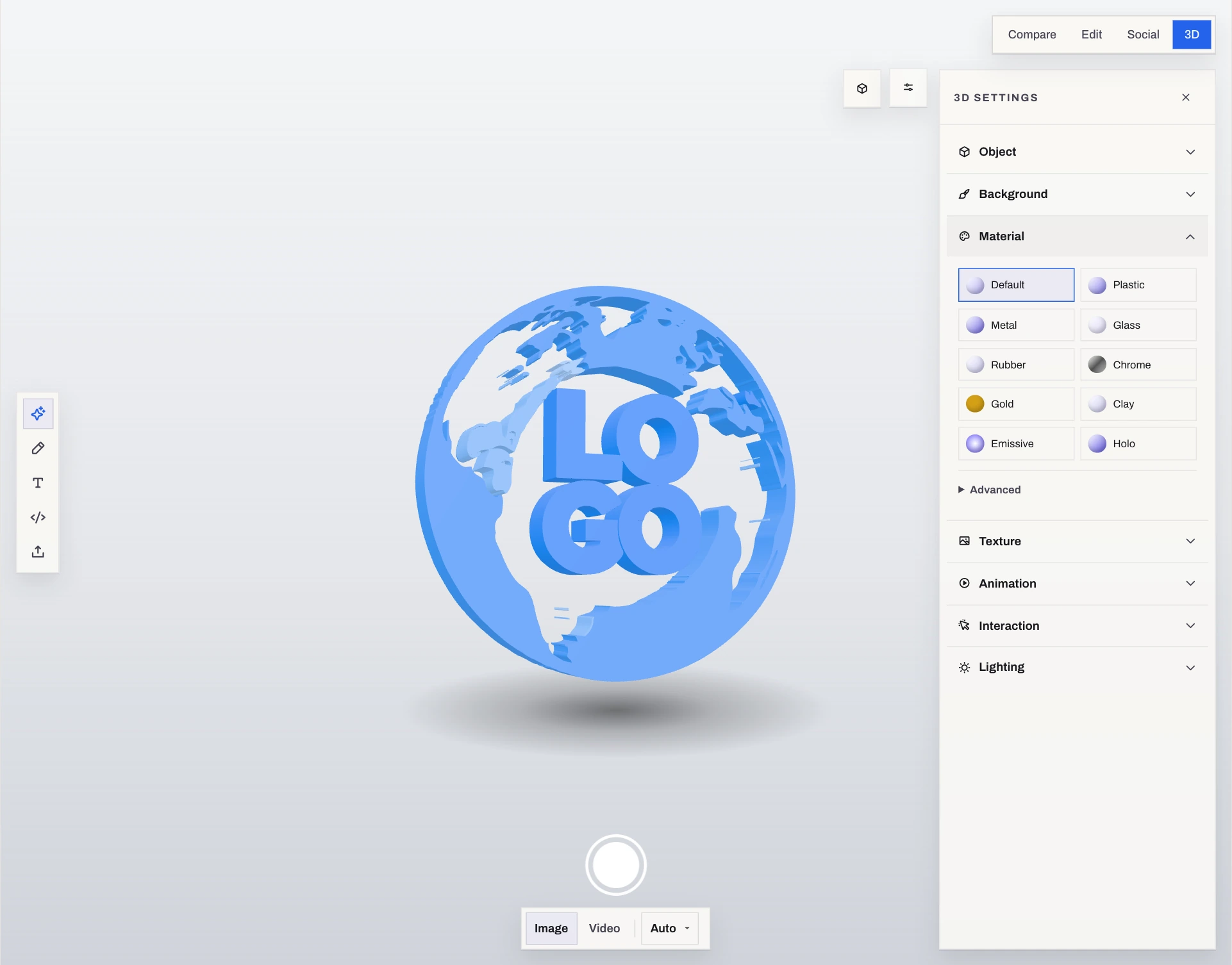
Turn vector shapes into 3D artwork. Adjust depth, materials, lighting, and animation, then export a still, a video, or a model.
Stills for your site and launch graphics
Animation for moving brand visuals
Models in GLB, STL, OBJ, or PLY
Free exports. Requires vector shapes and a browser with WebGL; video formats vary by browser.
Open the Workspace02 / Branded QR
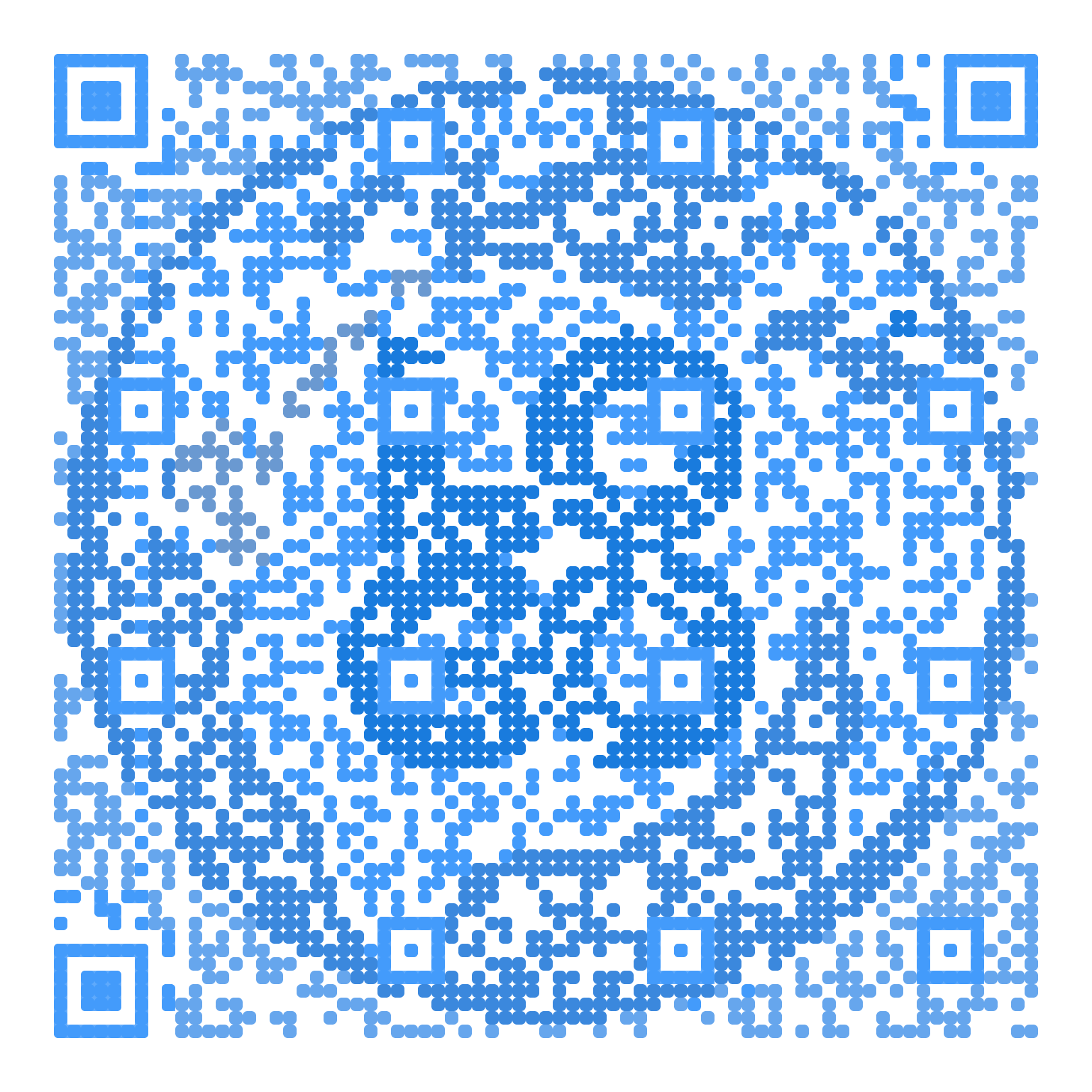
Make the code part of your brand.
Build QR artwork around your logo and colors. LogoNuri checks the rendered code before download and can simplify the artwork to preserve readability.
With Pro, remove the watermark, edit a dynamic code’s destination later, and view scan analytics.
Static codes are free with a watermark. Test your final printed code on real devices.
Create a Branded QR03 / Social graphics
 Your brand.
Your next big thing.
Give your next link a better first impression.
Compose your logo on a branded background, adjust its position and scale, or frame a website screenshot in a browser window.
Prepare a 1200 × 630 link preview and a square post. The Pro brand kit also adds profile avatars and social banners.
Design free; export packs with Pro. Website capture uses an online service.
Design a Social CardAll tools
Everything, in one place
Start with a focused tool or bring the workflow together in the full app. Core logo processing runs locally; website imports and captures use online services.
Explore the toolkit
Generate
Image Tools
Developer
Pricing
Try your logo free. Take the full kit with Pro.
Free
Refine your logo and export your SVG
- SVG vectorization
- SVGO optimization
- Background removal
- Color extraction & palette tools
- Favicon previewSee your icon at 16–48 px; the download pack is Pro
- Social card designerCompose social cards on the canvas; the export pack is Pro
- Dark mode SVGs
- SVG download & copy
- AI 4x super-resolution — 5/day
- AI background removal — 5/day
- 1 project saved in your browser
- QR codes
- No signup required
Pro
For launch assets, repeat projects, and client handoffs
Save 45% vs monthly
- Everything in Free, plus:
- AI 4x super-resolution — unlimited
- AI background removal — unlimited
- Cloud sync across devices
- Download full brand kit as ZIP
- Favicon, social card & PWA splash packs (ZIP)Every size, with the HTML snippets
- PDF export & PNG size presets
- Batch import & export
- Public hosted brand kit
- QR codes without a watermark
- Dynamic QR codes with editable destinations
- Email support
FAQ
Good questions.
Clear answers.
The details behind the workflow, the files, and your plan.
Something else on your mind?Your uploaded logo is processed locally for cleanup, vectorization, upscaling, and asset generation. Pro cloud sync sends saved project assets to our storage, and publishing a brand kit makes the assets you share public. Website imports and captures send the address you enter to our services. Accounts, billing, entitlement checks, analytics, and dynamic QR codes also use the network. See our Privacy Policy for details.
Accounts use your email address for magic-link sign-in and a Stripe customer ID for billing. Cloud projects and published brand kits store the assets you choose to save or share. We also use self-hosted Umami analytics for page views and selected interactions. Core logo processing does not upload your artwork. Our Privacy Policy explains storage, analytics, and deletion in more detail.
PNG, JPG, WebP, GIF, and SVG, up to 20 MB per file. HEIC and HEIF also work when your browser can decode them. Flat artwork with clear edges and a transparent or solid background usually traces best. Photos, gradients, and tiny text may need adjustment; compare the result before exporting.
Free lets you download your SVG and a PNG at its existing size. Pro adds full brand-kit and asset-pack ZIPs, PNG size presets, and PDF exports. A brand kit can include logo variations, favicons, an Apple Touch Icon, maskable icons, a web manifest, social images, palette files in CSS and JSON, HTML snippets, a runtime PWA splash script, and a brand guidelines PDF. The exact files depend on the available outputs; vector-only files require a successful vector result.
Use a current Chrome, Edge, Firefox, or Safari browser with WebAssembly support. Performance and available features depend on your device: 3D needs WebGL, and video export formats vary by browser. LogoNuri can also be installed as a PWA on supported desktop and mobile browsers.
LogoNuri traces raster artwork into SVG paths using VTracer in a browser worker. Automatic processing can compare candidate traces against the source, while manual controls let you adjust curves, colors, and detail. Spline, polygon, and pixel modes cover different artwork styles, and SVGO reduces unnecessary SVG data. Complex artwork may use a simplified trace or raster fallback, so inspect the preview before using the result.
AI Enhance uses Real-ESRGAN for 4× image upscaling in your browser. It can help with small source images, but results depend on the artwork and cannot guarantee recovery of missing detail. The model downloads on first use, and processing speed depends on your device. Free includes 5 upscales per day; Pro has no daily usage cap.
Yes. Paste a public website URL to look for logo images, favicons, and Open Graph images, then choose a candidate to load into the editor. This uses our online import service. Some websites block automated access or do not expose a suitable image; you can upload a local file instead.
Yes. If your logo already has a transparent background, LogoNuri preserves it. If it has a solid background (white, black, or any color), the auto background removal tool detects and removes it with adjustable tolerance. You can also pick any color from the image and remove it manually.
Use the editor without an account: vectorize, refine, remove solid backgrounds, adjust colors, preview favicons, design social cards, and create theme-aware SVGs. Download your SVG or a PNG at its existing size, save one project locally, and use the 3D workspace with free exports. AI upscaling and AI background removal each include 5 uses per day. Static QR codes are free with a watermark. Favicon, social, PWA, and full brand-kit export packs require Pro.
Pro adds full brand-kit ZIPs; favicon, social, and PWA packs; PDF and PNG size presets; batch processing; hosted brand sharing; unlimited local projects; and cloud sync for up to 100 projects. It also removes daily caps on AI upscaling and AI background removal, removes the QR watermark, and supports up to 50 active dynamic QR codes with editable destinations and scan analytics.
$9 per month or $59 per year. Annual billing saves about 45% compared with twelve monthly payments, and both subscriptions include the same features. Payments are handled through Stripe.
Yes. Cancel through billing settings at any time. Pro remains active until the end of your current billing period. Downloaded files stay on your device. Creating new Pro exports and using cloud sync require an active subscription.
No account is needed for the core editor, free downloads, or one locally saved project. Sign in with a passwordless email link to subscribe to Pro and use account-based features such as cloud sync and public brand sharing.
Yes. Refine client artwork locally, then use Pro to export brand kits, batch-process logos, and publish downloadable brand pages. Cloud sync and publishing upload the assets used by those services, so choose the workflow that fits the project.
Yes. You can adjust color detail, layer stacking, noise filtering, and curve settings. Gradients are approximated with color bands. Compare the preview with your original, especially for subtle gradients and small text.
It lets SVG fills follow the CSS text color when the SVG is embedded inline. The Smart option adapts selected near-black or near-white fills while keeping brand colors. This makes theme changes easier without manually recoloring each path. A separate SVG loaded with an image tag does not inherit its parent page’s text color.
LogoNuri renders five standard PNG sizes (16, 32, 48, 192, and 512 px), an Apple Touch Icon at 180 px, Android maskable icons at 192 and 512 px, and a multi-size ICO. Pro packs include a web manifest and installation snippet, plus an SVG favicon when a vector source is available. Preview the small sizes before export to check that your mark stays recognizable.
Core local processing can work after the app and required modules have loaded or been cached. AI tools also need their model files. Sign-in, billing, entitlement checks, cloud sync, public sharing, website imports and captures, and dynamic QR services need a connection. Do not rely on every Pro or AI operation being available offline.
LogoNuri starts with artwork you already have and helps you prepare it for use. The workflow connects cleanup and SVG tracing with theme variants, favicon and social assets, 3D visuals, QR codes, and a documented brand-kit handoff. It is especially useful when the logo exists, but the launch assets still need work.
A direct line
Let’s make
your next launch
look the part.
A question about your workflow, an idea for LogoNuri, or a detail you need a hand with? Tell us what you’re working on.
Thanks — your message is on its way. We'll reply by email.